CHelpPrSheet Class Reference
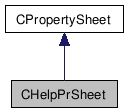
Detailed Description
CHelpPrSheet.This class can be used as a base class for all dialogs that wish to use context-sensitive Help. It will properly route the context Help options to the main app's WinHelp implementation. It has the following features: 1) F1 will result in the display of Help for the whole dialog. 2) Shift + F1 will result in context Help for the control that currently has focus. Note that there is an alternative here. If you want Shift + F1 to be equivalent to clicking the '?' button, ie, you want the floating arrow to appear, just define the symbol FLOATING_ARROW in the .cpp file.
All you need to do is the following: 1) Build your Property Pages as you normally would. 2) If you want context-sensitive Help, make sure you check the Context Help check box in the More Styles tab of the resource editor. 3) For any controls that you want context-sensitive Help, make sure you check the Help ID check box in the General tab of the resource editor. 4) Use Class Wizard and derive from CPropertyPage as you normally would. 5) Use Class Wizard and create a new class derived from CPropertySheet. 6) Edit the .h and .cpp files and make CHelpPrSheet the base class instead of CPropertySheet. Note you must replace ALL refs to CPropertySheet with CHelpPrSheet. 7) Enjoy!
Note that this presumes you have selected the Context-Sensitive Help option when you created your project. This will do the right thing about creating the resource.hm and YourProject.hm files.